
🔐 How to Reset Your Password in Mr. Rebounder®
Forgot your password? No problem! Follow these simple steps to reset your password in the Mr. Rebounder® app:
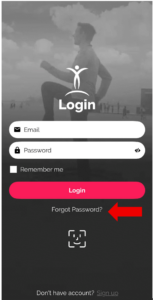
Step 1: Tap Forgot Password
👉 From the login screen, tap “Forgot Password”.
Step 2: Enter Your Email
📧 Enter your email address and tap Submit.

Step 3: Check Your Email
📬 Check your email inbox for a message from Mr. Rebounder®.
🔗 Click the “Reset Password” link in the email. For best results, open it using Google Chrome.

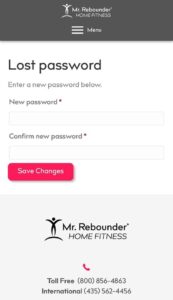
Step 4: Set a New Password
🔑 Enter your new password and select Save Changes.
Step 5: Log In Again
🔁 Return to the login page and sign in with your new password.
✅ You’re all set! If you don’t see the email within a few minutes, be sure to check your spam or junk folder.